10. Self-Learning Experiment
About 8 min
Routine Code
'''
This example demonstrates self-classification learning using the KPU neural network.
It has three modes: initialization, training, and classification.
Instructions:
1. Initialization mode: Press the BOOT key to enter initialization mode. The screen displays "Init".
2. Training mode: Press the BOOT key to enter training mode. The screen displays "Train object 1".
    Press the BOOT key to capture an image. The screen displays "Train object 1\r\n\r\nBOOT key to take #P2".
    Press the BOOT key to capture another image. The screen displays "Train object 1\r\n\r\nBOOT key to take #P3".
3. Classification mode: Press the BOOT key to enter classification mode. The screen displays "Classification".

'''
import lcd
import sensor
import time
from maix import GPIO
from maix import KPU
from board import board_info
from fpioa_manager import fm
from image import Image

####################################################################################################################
class STATE(object):
    IDLE = 0
    INIT = 1
    TRAIN_CLASS_1 = 2
    TRAIN_CLASS_2 = 3
    TRAIN_CLASS_3 = 4
    CLASSIFY = 5
    STATE_MAX = 6


class EVENT(object):
    POWER_ON = 0            # power on event
    BOOT_KEY = 1            # press BOOT key event
    BOOT_KEY_LONG_PRESS = 2 # long press BOOT key event
    EVENT_NEXT_MODE = 3     # next mode event
    EVENT_MAX = 4


class StateMachine(object):
    def __init__(self, state_handlers, event_handlers, transitions):
        self.previous_state = STATE.IDLE
        self.current_state = STATE.IDLE
        self.state_handlers = state_handlers
        self.event_handlers = event_handlers
        self.transitions = transitions

    def reset(self):
        '''
        Reset the state machine
        '''
        self.previous_state = STATE.IDLE
        self.current_state = STATE.IDLE

    # Look up the next state from the transitions table based on the current state and the event
    def get_next_state(self, cur_state, cur_event):
        '''
        Look up the next state from the transitions table based on the current state and event
        :param cur_state:
        :param cur_event:
        :return:
            next_state: next state
            None: no matching state found
        '''
        for cur, next, event in self.transitions:
            if cur == cur_state and event == cur_event:
                return next
        return None

    # execute action before enter current state
    def enter_state_action(self, state, event):
        '''
        Execute the enter action for the current state
        :param state: current state
        :param event: current event
        :return:
        '''
        try:
            if self.state_handlers[state][0]:
                self.state_handlers[state][0](self, state, event)
        except Exception as e:
            print(e)

    # execute action of current state
    def execute_state_action(self, state, event):
        '''
        Execute the action function for the current state
        :param state:   current state
        :param event:   current event
        :return:
        '''
        try:
            if self.state_handlers[state][1]:
                self.state_handlers[state][1](self, state, event)
        except Exception as e:
            print(e)

    # execute action when exit state
    def exit_state_action(self, state, event):
        '''
        Execute the exit action for the current state
        :param state: current state
        :param event: current event
        :return:
        '''
        try:
            if self.state_handlers[state][2]:
                self.state_handlers[state][2](self, state, event)
        except Exception as e:
            print(e)

    # Send the event. Based on the current state and the event, the next state is found and the appropriate action is taken.
    def emit_event(self, event):
        '''
        Emit an event. Based on the current state and event, find the next state and execute the corresponding action.
        :param event: event to emit
        :return:
        '''
        next_state = self.get_next_state(self.current_state, event)

        # execute enter function and exit function when state changed
        if next_state != None and next_state != self.current_state:
            self.exit_state_action(self.previous_state, event)
            self.previous_state = self.current_state
            self.current_state = next_state
            self.enter_state_action(self.current_state, event)
            print("event valid: {}, cur: {}, next: {}".format(event, self.current_state, next_state))

        # call state action for each event
        self.execute_state_action(self.current_state, event)

    # The state machine engine, used to execute the state machine
    def engine(self):
        '''
        State machine engine for executing the state machine
        :return:
        '''
        pass

# Restart the state machine program
def restart(self):
    '''
    Restart the state machine program
    :return:
    '''
    global features
    self.reset()
    features.clear()
    self.emit_event(EVENT.POWER_ON)


def enter_state_idle(self, state, event):
    print("enter state: idle")


def exit_state_idle(self, state, event):
    print("exit state: idle")


def state_idle(self, state, event):
    global central_msg
    print("current state: idle")
    central_msg = None


def enter_state_init(self, state, event):
    global img_init
    print("enter state: init")
    img_init = Image(size=(lcd.width(), lcd.height()))


def exit_state_init(self, state, event):
    print("exit state: init")
    del img_init


def state_init(self, state, event):
    print("current state: init, event: {}".format(event))

    # switch to next state when BOOT key is pressed
    if event == EVENT.BOOT_KEY:
        self.emit_event(EVENT.EVENT_NEXT_MODE)
    elif event == EVENT.BOOT_KEY_LONG_PRESS:
        restart(self)
        return


def enter_state_train_class_1(self, state, event):
    print("enter state: train class 1")
    global train_pic_cnt, central_msg, bottom_msg
    train_pic_cnt = 0
    central_msg = "Train class 1"
    bottom_msg = "Take pictures of 1st class"


def exit_state_train_class_1(self, state, event):
    print("exit state: train class 1")


def state_train_class_1(self, state, event):
    global kpu, central_msg, bottom_msg, features, train_pic_cnt
    global state_machine
    print("current state: class 1")

    if event == EVENT.BOOT_KEY_LONG_PRESS:
        restart(self)
        return

    if train_pic_cnt == 0:  # 0 is used for prompt only
        features.append([])
        train_pic_cnt += 1
    elif train_pic_cnt <= max_train_pic:
        central_msg = None
        img = sensor.snapshot()
        feature = kpu.run_with_output(img, get_feature=True)
        features[0].append(feature)
        bottom_msg = "Class 1: #P{}".format(train_pic_cnt)
        train_pic_cnt += 1
    else:
        state_machine.emit_event(EVENT.EVENT_NEXT_MODE)


def enter_state_train_class_2(self, state, event):
    print("enter state: train class 2")
    global train_pic_cnt, central_msg, bottom_msg
    train_pic_cnt = 0
    central_msg = "Train class 2"
    bottom_msg = "Change to 2nd class please"


def exit_state_train_class_2(self, state, event):
    print("exit state: train class 2")


def state_train_class_2(self, state, event):
    global kpu, central_msg, bottom_msg, features, train_pic_cnt
    global state_machine
    print("current state: class 2")

    if event == EVENT.BOOT_KEY_LONG_PRESS:
        restart(self)
        return

    if train_pic_cnt == 0:
        features.append([])
        train_pic_cnt += 1
    elif train_pic_cnt <= max_train_pic:
        central_msg = None
        img = sensor.snapshot()
        feature = kpu.run_with_output(img, get_feature=True)
        features[1].append(feature)
        bottom_msg = "Class 2: #P{}".format(train_pic_cnt)
        train_pic_cnt += 1
    else:
        state_machine.emit_event(EVENT.EVENT_NEXT_MODE)


def enter_state_train_class_3(self, state, event):
    print("enter state: train class 3")
    global train_pic_cnt, central_msg, bottom_msg
    train_pic_cnt = 0
    central_msg = "Train class 3"
    bottom_msg = "Change to 3rd class please"


def exit_state_train_class_3(self, state, event):
    print("exit state: train class 3")


def state_train_class_3(self, state, event):
    global kpu, central_msg, bottom_msg, features, train_pic_cnt
    global state_machine
    print("current state: class 3")

    if event == EVENT.BOOT_KEY_LONG_PRESS:
        restart(self)
        return

    if train_pic_cnt == 0:
        features.append([])
        train_pic_cnt += 1
    elif train_pic_cnt <= max_train_pic:
        central_msg = None
        img = sensor.snapshot()
        feature = kpu.run_with_output(img, get_feature=True)
        features[2].append(feature)
        bottom_msg = "Class 3: #P{}".format(train_pic_cnt)
        train_pic_cnt += 1
    else:
        state_machine.emit_event(EVENT.EVENT_NEXT_MODE)


def enter_state_classify(self, state, event):
    global central_msg, bottom_msg
    print("enter state: classify")
    central_msg = "Classification"
    bottom_msg = "Training complete! Start classification"


def exit_state_classify(self, state, event):
    print("exit state: classify")


def state_classify(self, state, event):
    global central_msg, bottom_msg
    print("current state: classify, {}, {}".format(state, event))
    if event == EVENT.BOOT_KEY:
        central_msg = None
    if event == EVENT.BOOT_KEY_LONG_PRESS:
        restart(self)
        return


def event_power_on(self, value=None):
    print("emit event: power_on")


def event_press_BOOT_key(self, value=None):
    global state_machine
    print("emit event: BOOT_key")


def event_long_press_BOOT_key(self, value=None):
    global state_machine
    print("emit event: BOOT_key_long_press")


# state action table format:
#   state: [enter_state_handler, execute_state_handler, exit_state_handler]
state_handlers = {
    STATE.IDLE: [enter_state_idle, state_idle, exit_state_idle],
    STATE.INIT: [enter_state_init, state_init, exit_state_init],
    STATE.TRAIN_CLASS_1: [enter_state_train_class_1, state_train_class_1, exit_state_train_class_1],
    STATE.TRAIN_CLASS_2: [enter_state_train_class_2, state_train_class_2, exit_state_train_class_2],
    STATE.TRAIN_CLASS_3: [enter_state_train_class_3, state_train_class_3, exit_state_train_class_3],
    STATE.CLASSIFY: [enter_state_classify, state_classify, exit_state_classify]
}

# event action table, can be enabled while needed
event_handlers = {
    EVENT.POWER_ON: event_power_on,
    EVENT.BOOT_KEY: event_press_BOOT_key,
    EVENT.BOOT_KEY_LONG_PRESS: event_long_press_BOOT_key
}

# Transition table
transitions = [
    [STATE.IDLE, STATE.INIT, EVENT.POWER_ON],
    [STATE.INIT, STATE.TRAIN_CLASS_1, EVENT.EVENT_NEXT_MODE],
    [STATE.TRAIN_CLASS_1, STATE.TRAIN_CLASS_2, EVENT.EVENT_NEXT_MODE],
    [STATE.TRAIN_CLASS_2, STATE.TRAIN_CLASS_3, EVENT.EVENT_NEXT_MODE],
    [STATE.TRAIN_CLASS_3, STATE.CLASSIFY, EVENT.EVENT_NEXT_MODE]
]


####################################################################################################################
class Button(object):
    DEBOUNCE_THRESHOLD = 30      # Debounce threshold (ms)
    LONG_PRESS_THRESHOLD = 1000  # Long press threshold (ms)
    # Internal key states
    IDLE = 0
    DEBOUNCE = 1
    SHORT_PRESS = 2
    LONG_PRESS = 3

    def __init__(self, state_machine):
        self._state = Button.IDLE
        self._key_ticks = 0
        self._pre_key_state = 1
        self.SHORT_PRESS_BUF = None
        self.st = state_machine

    def reset(self):
        self._state = Button.IDLE
        self._key_ticks = 0
        self._pre_key_state = 1
        self.SHORT_PRESS_BUF = None

    def key_up(self, delta):
        # print("up:{}".format(delta))
        # On key up, send cached key info if present; otherwise reset state directly
        if self.SHORT_PRESS_BUF:
            self.st.emit_event(self.SHORT_PRESS_BUF)
        self.reset()

    def key_down(self, delta):
        # print("dn:{},t:{}".format(delta, self._key_ticks))
        if self._state == Button.IDLE:
            self._key_ticks += delta
            if self._key_ticks > Button.DEBOUNCE_THRESHOLD:
                # When main loop period is too large, debounce phase may be skipped
                self._state = Button.SHORT_PRESS
                self.SHORT_PRESS_BUF = EVENT.BOOT_KEY  # Send when key up
            else:
                self._state = Button.DEBOUNCE
        elif self._state == Button.DEBOUNCE:
            self._key_ticks += delta
            if self._key_ticks > Button.DEBOUNCE_THRESHOLD:
                self._state = Button.SHORT_PRESS
                self.SHORT_PRESS_BUF = EVENT.BOOT_KEY  # Send when key up
        elif self._state == Button.SHORT_PRESS:
            self._key_ticks += delta
            if self._key_ticks > Button.LONG_PRESS_THRESHOLD:
                self._state = Button.LONG_PRESS
                self.SHORT_PRESS_BUF = None
                self.st.emit_event(EVENT.BOOT_KEY_LONG_PRESS)
        elif self._state == Button.LONG_PRESS:
            self._key_ticks += delta
            # LONG_PRESS signal is sent at latest here; subsequent events are ignored until key_up exits the state machine.
            pass
        else:
            pass


####################################################################################################################
# State machine main loop is not enabled, so functions that need to run in a loop are placed in while True
def loop_init():
    if state_machine.current_state != STATE.INIT:
        return

    img_init.draw_rectangle(0, 0, lcd.width(), lcd.height(), color=(0, 0, 255), fill=True, thickness=2)
    img_init.draw_string(65, 90, "Self Learning Demo", color=(255, 255, 255), scale=2)
    img_init.draw_string(5, 210, "Short press:  next", color=(255, 255, 255), scale=1)
    img_init.draw_string(5, 225, "Long press:    restart", color=(255, 255, 255), scale=1)
    lcd.display(img_init)


def loop_capture():
    global central_msg, bottom_msg
    img = sensor.snapshot()
    if central_msg:
        img.draw_rectangle(0, 90, lcd.width(), 22, color=(0, 0, 255), fill=True, thickness=2)
        img.draw_string(55, 90, central_msg, color=(255, 255, 255), scale=2)
    if bottom_msg:
        img.draw_string(5, 208, bottom_msg, color=(0, 0, 255), scale=1)
    lcd.display(img)


def loop_classify():
    global central_msg, bottom_msg
    img = sensor.snapshot()

    scores = []
    feature = kpu.run_with_output(img, get_feature=True)
    high = 0
    index = 0
    for j in range(len(features)):
        for f in features[j]:
            score = kpu.feature_compare(f, feature)
            if score > high:
                high = score
                index = j
    if high > THRESHOLD:
        bottom_msg = "class:{},score:{:2.1f}".format(index + 1, high)
    else:
        bottom_msg = None

    # display info
    if central_msg:
        print("central_msg:{}".format(central_msg))
        img.draw_rectangle(0, 90, lcd.width(), 22, color=(0, 255, 0), fill=True, thickness=2)
        img.draw_string(55, 90, central_msg, color=(255, 255, 255), scale=2)
    if bottom_msg:
        print("bottom_msg:{}".format(bottom_msg))
        img.draw_string(5, 208, bottom_msg, color=(0, 255, 0), scale=1)
    lcd.display(img)

####################################################################################################################
# main loop
features = []
THRESHOLD = 98.5    # Comparison threshold; higher values are stricter
train_pic_cnt = 0   # Number of training images for the current class
max_train_pic = 5   # Maximum training images per class

central_msg = None  # Information displayed in the center of the screen
bottom_msg = None   # Information displayed at the bottom of the screen

fm.register(board_info.BOOT_KEY, fm.fpioa.GPIOHS0)
BOOT_gpio = GPIO(GPIO.GPIOHS0, GPIO.IN)

lcd.init()
sensor.reset()
sensor.set_pixformat(sensor.RGB565)
sensor.set_framesize(sensor.QVGA)
sensor.set_windowing((224, 224))
sensor.skip_frames(time=100)

kpu = KPU()
print("ready load model")
kpu.load_kmodel("/sd/KPU/self_learn_classifier/mb-0.25.kmodel")

state_machine = StateMachine(state_handlers, event_handlers, transitions)
state_machine.emit_event(EVENT.POWER_ON)

btn_ticks_prev = time.ticks_ms()
BOOT_btn = Button(state_machine)

while True:
    btn_ticks_cur = time.ticks_ms()
    delta = time.ticks_diff(btn_ticks_cur, btn_ticks_prev)
    btn_ticks_prev = btn_ticks_cur
    if BOOT_gpio.value() == 0:
        BOOT_btn.key_down(delta)
    else:
        BOOT_btn.key_up(delta)

    if state_machine.current_state == STATE.INIT:
        loop_init()
    elif state_machine.current_state == STATE.CLASSIFY:
        loop_classify()
    elif state_machine.current_state == STATE.TRAIN_CLASS_1 \
            or state_machine.current_state == STATE.TRAIN_CLASS_2 \
            or state_machine.current_state == STATE.TRAIN_CLASS_3:
        loop_capture()
Experiment Preparation
- First transfer model files to the TF card, then insert the TF card into the K210 module's TF card slot. For detailed steps, see Transfer Model Files to TF Card.
- Prepare any three different objects.
- Connect the K210 to your computer via USB.
- Open CanMV IDE and run the routine code above.
Experiment Results
- After boot completes, the LCD displays "Self Learning Demo" with prompts to press once for the next state or long-press to restart. Press the BOOT key once to enter the next state.

- Begin training the first object. Press the BOOT key once to proceed and start capturing training images.

- Place the first object to be recognized within the camera's field of view. The lower-left corner displays "Class 1: #P1". Press the BOOT key to record the first training image for class 1. "Class" is the class number; "P" is the picture number.

- Slightly change the shooting angle and press the BOOT key again to capture a second image. After five images are captured, class 1 training ends and prompts you to proceed to class 2.

- Proceed to class 2 training. Press the BOOT key to begin capturing class 2 images using the same steps as class 1.
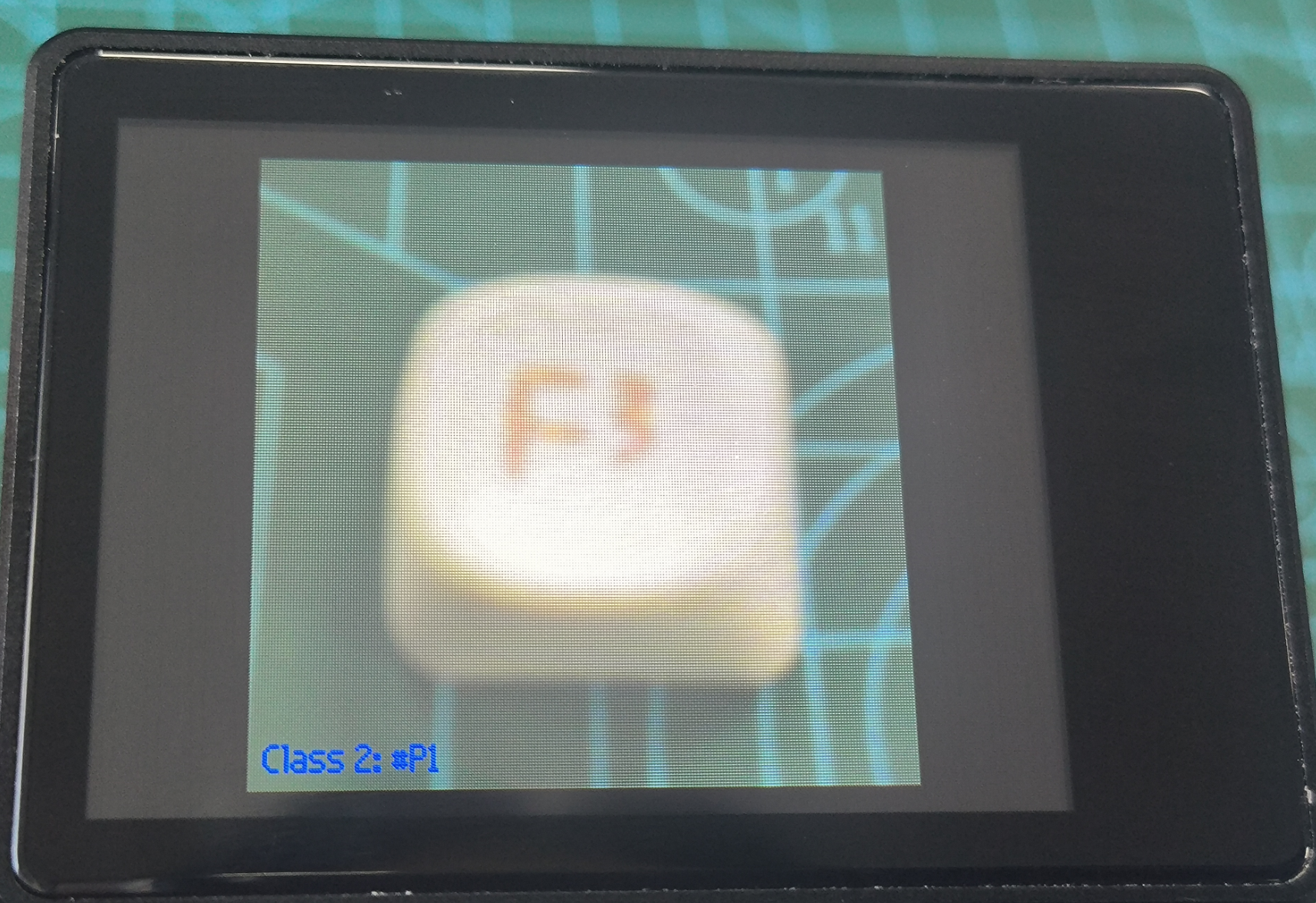
- After five class 2 images are captured, you are prompted to proceed to class 3. Press the BOOT key to capture five class 3 images.

- After training completes, the system automatically enters classification mode. "Classification" displayed in the center indicates classification mode. Press the BOOT key once to dismiss the prompt.

- Point the camera at one of the three trained classes. The lower-left corner displays the corresponding class number and score.

- If recognition quality is poor or image capture failed, press reset or long-press the BOOT key to restart.
Routine Code Explanation
- Import the required libraries, initialize the camera and LCD display, and load the model file
/sd/KPU/self_learn_classifier/mb-0.25.kmodel.
- Import the required libraries, initialize the camera and LCD display, and load the model file
kpu = KPU()
print("ready load model")
kpu.load_kmodel("/sd/KPU/self_learn_classifier/mb-0.25.kmodel")- The routine has three state types: INIT (initialization), CLASSIFY (classification), and TRAIN (training). Each state corresponds to a loop function that runs the program logic.
if state_machine.current_state == STATE.INIT:
    loop_init()
elif state_machine.current_state == STATE.CLASSIFY:
    loop_classify()
elif state_machine.current_state == STATE.TRAIN_CLASS_1 \
        or state_machine.current_state == STATE.TRAIN_CLASS_2 \
        or state_machine.current_state == STATE.TRAIN_CLASS_3:
loop_capture()- The initialization loop displays prompt information. Short-press the BOOT key to proceed; long-press to restart.
def loop_init():
    if state_machine.current_state != STATE.INIT:
        return

    img_init.draw_rectangle(0, 0, lcd.width(), lcd.height(), color=(0, 0, 255), fill=True, thickness=2)
    img_init.draw_string(65, 90, "Self Learning Demo", color=(255, 255, 255), scale=2)
    img_init.draw_string(5, 210, "Short press:  next", color=(255, 255, 255), scale=1)
    img_init.draw_string(5, 225, "Long press:    restart", color=(255, 255, 255), scale=1)
lcd.display(img_init)- The training loop displays the current class and progress. Multiple BOOT key presses are required during training. By default, three classes are trained with five images per class.
def loop_capture():
    global central_msg, bottom_msg
    img = sensor.snapshot()
    if central_msg:
        img.draw_rectangle(0, 90, lcd.width(), 22, color=(0, 0, 255), fill=True, thickness=2)
        img.draw_string(55, 90, central_msg, color=(255, 255, 255), scale=2)
    if bottom_msg:
        img.draw_string(5, 208, bottom_msg, color=(0, 0, 255), scale=1)
lcd.display(img)- The classification loop compares features and classifies the current camera view, displaying the matched class and recognition score.
def loop_classify():
    global central_msg, bottom_msg
    img = sensor.snapshot()

    scores = []
    feature = kpu.run_with_output(img, get_feature=True)
    high = 0
    index = 0
    for j in range(len(features)):
        for f in features[j]:
            score = kpu.feature_compare(f, feature)
            if score > high:
                high = score
                index = j
    if high > THRESHOLD:
        bottom_msg = "class:{},score:{:2.1f}".format(index + 1, high)
    else:
        bottom_msg = None

    # display info
    if central_msg:
        print("central_msg:{}".format(central_msg))
        img.draw_rectangle(0, 90, lcd.width(), 22, color=(0, 255, 0), fill=True, thickness=2)
        img.draw_string(55, 90, central_msg, color=(255, 255, 255), scale=2)
    if bottom_msg:
        print("bottom_msg:{}".format(bottom_msg))
        img.draw_string(5, 208, bottom_msg, color=(0, 255, 0), scale=1)
    lcd.display(img)